
Base64 Encoder / Decoder

Encode or decode Base64 strings instantly.

How to Use Base64 Encoder / Decoder

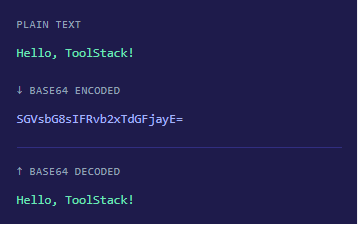
Encode or decode any text or Base64 string in just a few seconds — no signup needed.
1
Enter Your Text
Type or paste your plain text or Base64 string into the Input box.
2
Choose Action
Click Encode to convert text to Base64, or Decode to convert Base64 back to text.
3
See the Output
Your result appears instantly in the Output panel on the right side.
4
Copy & Use
Hit the Copy button to copy the encoded or decoded result to your clipboard.

What is Base64?

Base64 is a binary-to-text encoding scheme that represents binary data using only 64 printable ASCII characters — uppercase and lowercase letters, digits, +, and /. It is widely used to safely transmit data over systems that only support text.

Common use cases include embedding images directly in HTML or CSS using data: URIs, encoding email attachments, storing binary data in JSON, and passing credentials in HTTP Basic Authentication headers.


Base64 is not encryption — it is simply an encoding format. Anyone can decode a Base64 string without a key. Use it for data transport, not security.
FAQs

Frequently Asked Questions

Common questions about Base64 encoding and this tool.
What can I encode with Base64?
You can encode any plain text — including special characters, Unicode, HTML, JSON strings, URLs, passwords, and more. Base64 converts the raw bytes of any text into a safe ASCII string.
No. Base64 is purely an encoding scheme, not encryption. It does not protect your data — anyone can decode a Base64 string without any key. For security, use proper encryption like AES or RSA.
Base64 encodes data in groups of 3 bytes. If the input length is not a multiple of 3, padding characters (= or ==) are added at the end to complete the final group. This is completely normal and expected.
Yes, as long as the string is valid Base64. If the input contains invalid characters or incorrect padding, the decoder will return an error. Make sure to copy the complete Base64 string without any extra spaces or line breaks.
Yes — Base64 encoding increases the output size by approximately 33% compared to the original input. This is a known trade-off when converting binary data to a text-safe format for transmission.