
Regex Tester

Test and debug regular expressions with live matching.

/ /
0
Matches
0
Groups

Highlighted Matches

How to Use the Regex Tester

Test and debug your regular expressions live — no setup, no installation required.
1
Enter Your Regex
Type your regular expression in the Regular Expression field, e.g. \b[A-Z]\w+
2
Add Test String
Paste the text you want to search through in the Test String box below.
3
Set Flags
Optionally add flags like g, i, or m to control matching behaviour.
4
Click Test
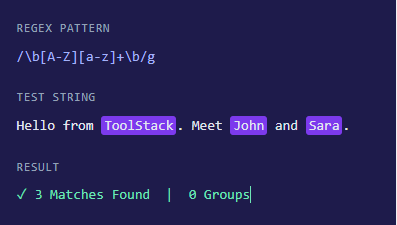
Hit the Test button and instantly see total matches, groups, and highlighted results.

What is a Regular Expression?

A Regular Expression (Regex) is a sequence of characters that defines a search pattern. It is used to find, match, and manipulate text in strings — from simple word searches to complex pattern validation.


Regex is supported in almost every programming language — JavaScript, Python, PHP, Java, and more. Developers use it daily for tasks like validating email addresses, extracting data from logs, replacing text, and parsing URLs.


Our Regex Tester lets you write and test your patterns in real time, showing you exactly which parts of your text match — saving you hours of trial and error.
FAQs

Frequently Asked Questions

Common questions about regular expressions and this tool.
What programming languages support Regex?
Regex is supported in virtually all major programming languages including JavaScript, Python, PHP, Java, Ruby, Perl, Go, and many more. While the core syntax is similar, some advanced features like lookbehinds or named groups may differ slightly between languages. Our tester uses JavaScript’s regex engine.
g (global) — finds all matches instead of stopping after the first. i (case-insensitive) — ignores upper/lowercase differences, so hello matches Hello and HELLO. m (multiline) — makes ^ and $ match the start and end of each line, not just the whole string.
A capture group is a part of a regex pattern wrapped in parentheses ( ). It captures the matched portion so you can reference or extract it separately. For example, (\d{4})-(\d{2})-(\d{2}) captures year, month, and day from a date string as three separate groups.
Common reasons include missing the g flag (so only the first match is found), incorrect escaping of special characters (always escape . * + etc. with a backslash), case mismatch without the i flag, or anchors like ^ and $ restricting the match too much.
Yes! Regex is one of the most common ways to validate formats like email addresses, phone numbers, URLs, zip codes, and more. You can test your validation pattern here before adding it to your code. For example, a basic email pattern like [a-zA-Z0-9._%+-]+@[a-zA-Z0-9.-]+\.[a-zA-Z]{2,} can be tested instantly.